Servo positioning start timing chart — "In position" right after the start still belongs to the previous position (sample)
Last updated: 2026-09-23 / Category: Samples, timing charts
One move, from the PLC handing the target position to the servo amplifier and starting, to deciding the move is complete (0.1 s divisions). Drawn for anyone who moved on at the in-position signal right after the start and had the next step begin before the axis moved.
Open this sample in the editor Download the JSON
The free browser editor opens in a new tab with this chart loaded. No installation, no sign-up, and nothing you enter is sent anywhere. Editing it does not change the sample on this page. The JSON is the source data for reopening it in the editor or handing it to an AI (format: JSON data format).
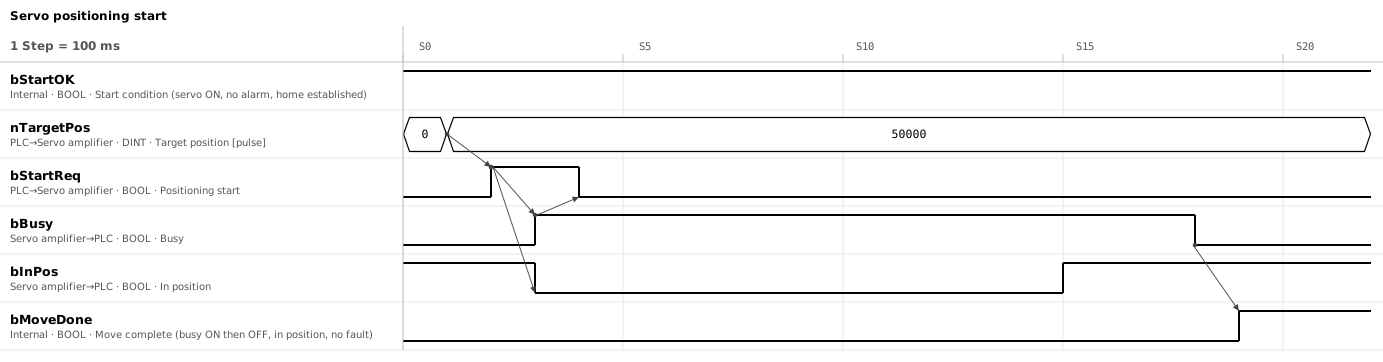
1. Six signals; move complete is made inside the PLC
| Signal | Direction | Meaning |
|---|---|---|
bStartOK | PLC (internal) | Start condition: servo ON and no alarm from the amplifier, plus home established. Home established means homing complete, or for an absolute encoder, the position is valid |
nTargetPos | PLC → servo amplifier | Target position [pulse] |
bStartReq | PLC → servo amplifier | Positioning start |
bBusy | Servo amplifier → PLC | Busy. ON from accepting the start until positioning ends. In this chart it also serves as the acknowledgement |
bInPos | Servo amplifier → PLC | In position. Depending on the model, ON when the difference from the target, or between the commanded and actual position (following error), is within the set band |
bMoveDone | PLC (internal) | Move complete. The condition for the next step: busy has been seen ON after the start, and then busy OFF and in-position ON both hold. Not raised if it stopped on a stop request or an error |
2. One move: target position → start → busy → complete
- S1 → S2: write the target position, then turn the start ON in the next step
- S2 → S3: the amplifier accepts the start, busy turns ON, the axis starts moving and in-position turns OFF
- S3 → S4: the PLC sees busy ON and turns the start OFF
- S15, S18: in-position turns ON as the target is approached; busy turns OFF when the motion ends
- S19: busy OFF and in-position ON both hold, with no stop request and no error, so move complete is raised. This assumes busy was seen ON at S3
3. Drop the start after the acknowledgement; decide completion only after seeing busy ON
- Start only after the target position has arrived If the start arrives first, the axis moves to the previous target. Leave one scan inside the PLC, or one update cycle over a network. If a 32-bit value is sent as two words, check that they are sent together.
- Drop the start only after the acknowledgement A one-scan pulse vanishes if it is shorter than the other side's read cycle. Dropping it after busy turns ON works whether the amplifier is edge- or level-triggered. Check first for PLCs that require the command input to stay ON throughout the move.
- Decide completion only after seeing busy ON following the start In-position is still ON from the previous position. Complete means busy went ON once after the start, and then busy OFF and in-position ON both hold. On models that chatter, require the ON to last a few tens of ms.
- Allow for very short moves Busy may be ON for only a few ms and be missed. Use the acknowledgement on models that latch it; on models without one, treat a target within the in-position band of the current position as complete without starting.
- Do not rewrite the target position while busy When it takes effect depends on the model and its settings. Rewrite only after move complete.
4. Not starting or not finishing: fault on a time limit
Give every wait a time limit and raise a fault when it is exceeded. The limit for the move is the travel time calculated from distance, speed and acceleration, plus a settling margin.
- No acknowledgement after the start: fault after about 0.5 s and show the amplifier's error signal and error number. A target outside the soft limits is an error at the start on most models. Some models do not apply soft limits before home is established
- Busy never turns OFF: a pause, or a speed override left at 0 %
- Busy is OFF but in-position never turns ON: a torque limit still active, so the target was not reached — a limit lowered for pressing and not restored, for example. Or gains too low to settle
Recovery after an alarm is drawn in a separate chart or flowchart, because whether homing must be repeated depends on the alarm.
5. Whatever the interface, read it as the same three: start, busy, complete
- Point-table type wired through I/O: the start, moving and in-position signals map almost directly to the three in this chart. A point number is passed instead of the target position. Check the model's manual for which signal is the acknowledgement
- PLCopen positioning function blocks: Execute, Busy and Done. The target position is read on the rising edge of Execute. Drop Execute before Done and Done lasts one scan only. Execute may stay ON until Done, Error or CommandAborted appears; being edge-triggered, the second point of section 3 ("drop after the acknowledgement") does not apply. The third point, "not stopped by a stop request or an error", means neither Error nor CommandAborted
- PLC positioning function (pulse output): check first whether the command input must be held or is edge-triggered. Completion is judged from both the PLC's "output finished" flag and the amplifier's in-position input (hard-wired)
- Two axes at once: starting them in the same scan does not guarantee they start together, and even then, different distances mean different arrival times and paths. Completion is the AND of each axis's move complete; for a coordinated path, use one interpolated start
- Homing: the same start-and-complete pair, drawn the same way. The start condition is the positioning start condition without home established (with it, homing itself could never start)
The tools this sample was made with
- Timing Chart Editor — The figure above and the sample JSON were made and exported with this editor.
- Flowchart Editor — Turns the arrows of the chart into a sequence of waits and processes.
Related articles
- Homing flowchart (sample)
- How to draw a timing chart
- Handshake timing chart (sample)
- Air cylinder timing chart (sample)
- Belt conveyor timing chart (sample)
yk.builds